Pages

Monday, June 30, 2014

SQL Security- How to hide your SQL Server Instance from network–TIP 22


To make your SQL server secure  one of the option is to hide the instance from network.

To achieve this you need to do following things

1) Go to Configuration tool folder and select configuration manager of SQL server as shown in below fig

SQL_server_Configuration_manager

2) Once Configuration manager is open select SQL Server Network configuration option. In this you will find the option protocols for MS SQL Server  as shown in fig

sql_Server_Configuration

3) Now select property of protocol of MSSQLSERVER. You will get below screen now in this screen you are seeing there is a property called hide instance by default it is false. make it true to hide instance from network.

hideinstance

I hope this article will help you to make your sql server instance hide from book,


Thanks

Rajat Jaiswal

Wednesday, June 25, 2014

How to open SQL Server Management studio from command prompt - TIP#21


It is just a simple tip nothing fancy.

On command prompt you just type SSMS and hit OK.


Your SQL server Management studio will be open.

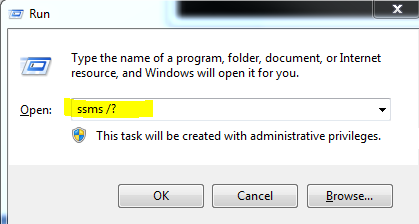
You can get other option also by typing ssms/? .


You will get below options


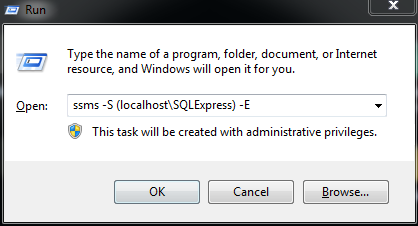
Now if you want to login to particular SQL Server Instance you can choose option as mention in above screen.


For example to open SQL Express version on my machine, I wrote query as shown in below image


Enjoy!!!


Monday, June 23, 2014

Looping through GO statement - TIP # 19


Although, I did not get chance to use this facility in my projects but it is good to know feature.

Suppose you want looping and want to insert data in table then in such situation you can use this GO lopping feature.

In below example We are inserting data into debug table with GO statement


Now  when you see the debug table you will find 1000 records are there.


 Enjoy !!!

Wednesday, June 18, 2014

Performance tips - Check no of logical & Physical reads TIP #18

Sometimes, we need to understand what exactly going on with particular statement, stored procedure why it is slow?

To check performance of statement what exactly going on we also interested how many logical reads, physical reads a particular statement taking.

To achieve this we need to write SET STATISTICS IO ON

For example
GO
SET STATISTICS IO ON 
SELECT * FROM [dbo].[RequestMaster]
SET STATISTICS IO OFF
GO


If your statement having large number of physical reads & logical reads then you need to think for optimization.

Enjoy

Monday, June 16, 2014

SET NOCOUNT ON – count in performance tip #17


Sometimes some small things which we ignore can impact more.

By default when you run any statement you will see in the message like no of records affected.
As shown in below figure.


Although, most of the time we do not require such information but still it is overhead.

So to stop such overhead which impact performance just use  SET NOCOUNT ON in your stored procedures.

For example
GO
SET NOCOUNT ON ;
 SELECT * FROM RequestMaster

GO

When you use SET NOCOUNT ON you will get a simple message
“ Command(s) completed successfully.”


Enjoy !!!

Thursday, June 12, 2014

Determine current date with different option TIP #16

We can determine date with different option in SQL server

Option 1:- with GETDATE() we can get current date & time
Go
  SELECT GETDATE()
GO

Option 2:- With sysDateTime()  , we can get current date & time (with nano seconds)
GO
   SELECT SYSDATETIME()
GO


Option 3:- with SYSDATETIMEOFFSET() , We can get current date & time with timezone offset
Go
  SELECT SYSDATETIMEOFFSET()
Go


Option 4:- with SYSUTCDATETIME() , We can get current date & time with UTC (Coordinated Universal Time)

GO
  SELECT SYSUTCDATETIME()
GO


Option 5:-
with GETUTCDATE() , We can get current date & Time with UTC
GO
  SELECT GETUTCDATE()
GO


Option 6:- with CURRENT_TIMESTAMP , we can get current date & Time
GO
  SELECT CURRENT_TIMESTAMP
GO


Enjoy !!!

Monday, June 9, 2014

How to determine when Last backup taken of a database n SQL Server? TIP #15


Sometime we require to know when we have taken last backup.
So let me share here all the backup, log shipping related detail you can find in the MSDB database which is system database.
SQL server maintain all the backup related detail in the MSDB database table
As Show in the figure

Now we can run the following command to determine the database backups
GO
SELECT Name,
       database_creation_date,
       backup_start_date ,
       backup_finish_date,
       database_name,
      bmf.physical_device_name
FROM MSDB.dbo.backupset bs
INNER JOIN msdb.dbo.backupmediafamily bmf  ON bmf.media_set_id = bs.media_set_id
WHERE database_name='DBayDB'

GO
WHERE DBAY is database name when you run this command you will get all the backup taken for this database.


Enjoy !!!