Pages

Showing posts with label System commands. Show all posts

Saturday, December 6, 2014

How to determine free space on each fixed drive of server machine using SQL SERVER ? TIP #75


When you do  SQL Server maintenance one of important aspect is available space on server drive because your SQL SERVER data is dependent on space Smile.

Now what you need to do to get free space from each drive ?

Just create a simple job which run on daily basis which send you space report on daily basis.

This available space report help you to prepare yourself for next step.

The job will content a simple SQL statement which is

EXEC MASTER..xp_fixeddrives

When you run this command in your SQL Management Studio you will get a tabular result which have 2 columns which is drive & Free space in MB.

As shown in below figure

fixed_drive_space_by_Sql_server_indiandotnet

I hope this might help you somewhere.

Thanks & Enjoy!!!

RJ!!

Saturday, October 25, 2014

Oh! I forgot When I took last Database Backup ? How to determine this? TIP # 66


In last few tips TIP #64 & TIP #65  we get information  how to take backup & How to ensure it can be restore? Now lets me share some more information related to backup.

Problem:-   Sometimes , we are interested to know when last backup is taken for particular database ?

Solution:  The first thing I want to share here that  you should have proper maintenance plan to take backup of database and by job History you are able to know when last backup is taken but if this is not the case then not to worry SQL Server maintain itself information related to backup. to determine this you need to write a simple query as shown below

SELECT 
   CONVERT(CHAR(100), SERVERPROPERTY('Servername')) AS Server,
   msdb.dbo.backupset.database_name, 
   msdb.dbo.backupset.backup_start_date, 
   msdb.dbo.backupset.backup_finish_date,
   msdb.dbo.backupset.expiration_date,
   CASE msdb..backupset.type 
       WHEN 'D' THEN 'Database' 
       WHEN 'L' THEN 'Log' 
   END AS backup_type, 
   msdb.dbo.backupset.backup_size, 
   msdb.dbo.backupmediafamily.logical_device_name, 
   msdb.dbo.backupmediafamily.physical_device_name,  
   msdb.dbo.backupset.name AS backupset_name,
   msdb.dbo.backupset.description
FROM   msdb.dbo.backupmediafamily 
   INNER JOIN msdb.dbo.backupset ON msdb.dbo.backupmediafamily.media_set_id = msdb.dbo.backupset.media_set_id

ORDER BY 
   msdb.dbo.backupset.database_name,
   msdb.dbo.backupset.backup_finish_date

  When I run above command I get information related backup like databasename, backup start date, Backup finish date, expiry date(if any) , backup type like whether it is database backup or Log backup , size of backup , path where database is taken, name of backup set.

see below snap for detail

backup_detail

I hope this tip might help you somewhere.

Thanks !!

Rj!!

Sunday, October 5, 2014

A hidden feature sp_MSforeachtable–run on entire tables of a Database TIP# 51

Problem:-

Sometimes it happened that you need to run a single statement on entire tables which exists in database.  so most of the time we think of cursor which run for each sys.objects (table)  and we execute the dynamic statement by replacing table name.

Solution:

Although the solution we are thinking is correct there is no issue at all but SQL SERVER made our life more each by providing “sp_MSForEachTable”  which is a hidden stored procedure.

By the name it is clear that it will run on each table.

Lets understand this by an example. Suppose you want to  row count of each table then you can write following statement.

DECLARE @tblRowCount AS TABLE (Counts  INT,
                               TableName VARCHAR(100))

INSERT INTO @tblRowCount (Counts,TableName)
EXEC sp_MSforeachtable
@command1='SELECT COUNT(1) As counts,''?'' as tableName FROM ?'


SELECT * FROM @TblRowCount ORDER BY Counts desc

Now when we run it we will get row count of each table as shown in below snap

sp_msforeachtable_rowcount


A part from it you can use this hidden feature in maintenance also like running re indexing, re organizing entire table index etc.

I hope this may help you some where.

Enjoy!!!

RJ!!

Thursday, September 4, 2014

3 different way to find row count of a table ? TIP #45


Problem:-

Many times you want to know how many rows exists in the particular tables.

So let me share 3 different way to know this thing

Solution:-

Let me share 3 different options

Option 1:-

You all aware of this term which is Count function

SELECT COUNT(1)  As Rows FROM [Person].[Person]

Option 2:-

Sp_Space used is another way to determine rows in table as shown in below figure

No_Of_Rows_Sp_Space_used

Option 3:-

it is little bit tricky but you will enjoy seeing this. We count the row number from cluster index

Partitionrownumber


I hope you enjoyed.

Thanks & Enjoy !!!

RJ

Sunday, August 24, 2014

Rename column name by SQL command TIP #38


Recently, One of my friends asked How to rename a column by SQL command frankly speaking I am not used too of using this command I prefer UI interface.

Lets understand this by an example.

Suppose I have a users table in which there is a column with name status which should be statusId but by typo mistake I added satus column.

Now below is command to rename column

SP_RENAME 'table.columnName’,’newcolumnname’,’COLUMN’

See below snap to resolve above problem of renaming satus to statusId

sp_rename_Column

Enjoy!!!

RJ

Wednesday, August 13, 2014

Easy way to find result set of a stored procedure without running it- TIP #32


Sometimes , We need to know what is the structure of stored procedure ? , How many columns will be return ?

So to determine this we have easy stored procedure provided by SQL Server which is sp_describe_First_Result_Set.

Below is the template to run it. You can provide your stored procedure name as variable

Execute sp_Describe_First_Result_set ‘ProcedureName’

In below snap I used Adventureworks database and try to find what will be the output columns of the stored procedure “uspgetBillOfMaterials”

As you see in below image after running above query we got all the result set columns

resultset

I hope this tip help you somewhere.

Enjoy !!!

Tuesday, July 29, 2014

Performance tips- How to clean buffer to test performance TIP#28


Dear Friends,

To test the performance of a stored procedure we run the stored procedure several time.

You have observed when you run the stored procedure first time it took time but when you run next time it is faster. It just because the stored procedure /data is cached.

Now , due to this cache problem we got a wrong assumption that the stored procedure is fast but in actual it it taking cache data.

To assure that when we run the stored procedure it will run on new set of data not from buffer data SQL Server provided a option which is called “DROPCLEANBUFFER”

You can run this command as shown in below fig

DROP_CLAN_BUFFER

Either way you can restart SQL Server services also Smile .

It is one of the effective command by which we can evaluate of stored procedure performance.

Enjoy !!

Thanks

Rajat Jaiswal

Wednesday, June 25, 2014

How to open SQL Server Management studio from command prompt - TIP#21


It is just a simple tip nothing fancy.

On command prompt you just type SSMS and hit OK.


Your SQL server Management studio will be open.

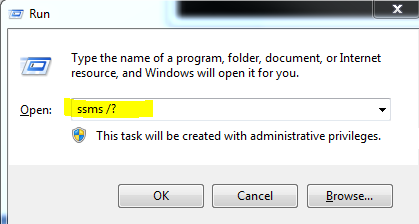
You can get other option also by typing ssms/? .


You will get below options


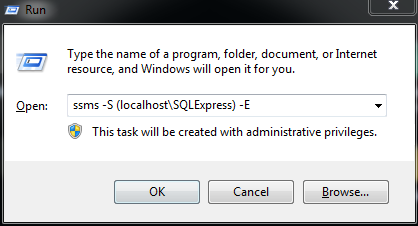
Now if you want to login to particular SQL Server Instance you can choose option as mention in above screen.


For example to open SQL Express version on my machine, I wrote query as shown in below image


Enjoy!!!


Monday, June 23, 2014

Looping through GO statement - TIP # 19


Although, I did not get chance to use this facility in my projects but it is good to know feature.

Suppose you want looping and want to insert data in table then in such situation you can use this GO lopping feature.

In below example We are inserting data into debug table with GO statement


Now  when you see the debug table you will find 1000 records are there.


 Enjoy !!!

Wednesday, June 18, 2014

Performance tips - Check no of logical & Physical reads TIP #18

Sometimes, we need to understand what exactly going on with particular statement, stored procedure why it is slow?

To check performance of statement what exactly going on we also interested how many logical reads, physical reads a particular statement taking.

To achieve this we need to write SET STATISTICS IO ON

For example
GO
SET STATISTICS IO ON 
SELECT * FROM [dbo].[RequestMaster]
SET STATISTICS IO OFF
GO


If your statement having large number of physical reads & logical reads then you need to think for optimization.

Enjoy

Monday, June 16, 2014

SET NOCOUNT ON – count in performance tip #17


Sometimes some small things which we ignore can impact more.

By default when you run any statement you will see in the message like no of records affected.
As shown in below figure.


Although, most of the time we do not require such information but still it is overhead.

So to stop such overhead which impact performance just use  SET NOCOUNT ON in your stored procedures.

For example
GO
SET NOCOUNT ON ;
 SELECT * FROM RequestMaster

GO

When you use SET NOCOUNT ON you will get a simple message
“ Command(s) completed successfully.”


Enjoy !!!

Thursday, June 12, 2014

Determine current date with different option TIP #16

We can determine date with different option in SQL server

Option 1:- with GETDATE() we can get current date & time
Go
  SELECT GETDATE()
GO

Option 2:- With sysDateTime()  , we can get current date & time (with nano seconds)
GO
   SELECT SYSDATETIME()
GO


Option 3:- with SYSDATETIMEOFFSET() , We can get current date & time with timezone offset
Go
  SELECT SYSDATETIMEOFFSET()
Go


Option 4:- with SYSUTCDATETIME() , We can get current date & time with UTC (Coordinated Universal Time)

GO
  SELECT SYSUTCDATETIME()
GO


Option 5:-
with GETUTCDATE() , We can get current date & Time with UTC
GO
  SELECT GETUTCDATE()
GO


Option 6:- with CURRENT_TIMESTAMP , we can get current date & Time
GO
  SELECT CURRENT_TIMESTAMP
GO


Enjoy !!!

Monday, June 9, 2014

How to determine when Last backup taken of a database n SQL Server? TIP #15


Sometime we require to know when we have taken last backup.
So let me share here all the backup, log shipping related detail you can find in the MSDB database which is system database.
SQL server maintain all the backup related detail in the MSDB database table
As Show in the figure

Now we can run the following command to determine the database backups
GO
SELECT Name,
       database_creation_date,
       backup_start_date ,
       backup_finish_date,
       database_name,
      bmf.physical_device_name
FROM MSDB.dbo.backupset bs
INNER JOIN msdb.dbo.backupmediafamily bmf  ON bmf.media_set_id = bs.media_set_id
WHERE database_name='DBayDB'

GO
WHERE DBAY is database name when you run this command you will get all the backup taken for this database.


Enjoy !!!

Thursday, June 5, 2014

How to update statistics ? TIP #14

b

In last TIP tip#13, We learn how to find last updated statistics status.

Now we know when it last updated so it may be require we need to update statistics for some of table.

So to update statistics we need to write following command ( if we want to update  statistics of entire tables objects)

Go

EXEC sp_updatestats;

GO

Update_Statistics_All

Now if we want to  update statistics of particular table then we need to write following command

GO

UPDATE STATISTICS tblProductStock

GO

Now if we want to update statistics of particular index of a table then we need to write following command

GO

UPDATE STATISTICS tblCustomer PK_tblCustomer;

GO

WHERE tblcustomer is table name and pk_tblCustomer is primary key


So enjoy !!!

GO

How to determine Last statistics update? TIP #13

To determine last statistics update we need to run following command.

Go
SELECT o.name, i.name AS [Index Name], 
       STATS_DATE(i.[object_id], i.index_id) AS [Statistics Date],
       s.auto_created, s.no_recompute, s.user_created
FROM sys.objects AS o WITH (NOLOCK)
INNER JOIN sys.indexes AS i WITH (NOLOCK)
ON o.[object_id] = i.[object_id]
INNER JOIN sys.stats AS s WITH (NOLOCK)
ON i.[object_id] = s.[object_id]
AND i.index_id = s.stats_id
WHERE o.[type] = 'U'
ORDER BY STATS_DATE(i.[object_id], i.index_id) ASC;   
GO


OR

We can use following statement

Go
DBCC SHOW_STATISTICS ('users',PK_User);
GO


Enjoy !!!


Monday, June 2, 2014

How to find what is currently running on your SQL SERVER? TIP # 12


When we are keen to know that what is currently running on SQL SERVER for analysis purpose then with the help of below SQL statement we can easily find those statements, Stored procedure, status etc.

Go
SELECT [Spid] = session_Id
, ecid
, [Database] = DB_NAME(sp.dbid)
, [User] = nt_username
, [Status] = er.status
, [Wait] = wait_type
, [Individual Query] = SUBSTRING (qt.text,
er.statement_start_offset/2,
(CASE WHEN er.statement_end_offset = -1
THEN LEN(CONVERT(NVARCHAR(MAX), qt.text)) * 2
ELSE er.statement_end_offset END -
er.statement_start_offset)/2)
,[Parent Query] = qt.text
, Program = program_name
, Hostname
, nt_domain
, start_time
FROM sys.dm_exec_requests er
INNER JOIN sys.sysprocesses sp ON er.session_id = sp.spid
CROSS APPLY sys.dm_exec_sql_text(er.sql_handle)as qt
WHERE session_Id > 50 — Ignore system spids.
AND session_Id NOT IN (@@SPID) — Ignore this current statement.
ORDER BY 1, 2
Go

Enjoy !!!


Sunday, June 1, 2014

How to set database as multi user TIP #11


As we mention in  TIP 10  to set database user as Single user now to make this available again for all the user or multi user we need to do following

ALTER DATABASE FriendsDB
SET MULTI_USER 
WITH  NO_WAIT;

GO

Here when we run above command  FriendsDB again changed to MULTI USER.

Here NO_WAIT means not wait for statement with immediate response.

When we run this command database again change to multi user as shown in below fig

Multi_User_Db


Enjoy !!!

How to set database as Single User TIP #10

Sometimes it is require to  set database as single user for maintenance or other recovery purpose.

We need to write following statement

GO

ALTER DATABASE FriendsDB
SET SINGLE_USER 
WITH  ROLLBACK IMMEDIATE;

GO

Here ROLLBACK IMMEDIATE  means if any transaction going on by other user then Rollback that data.

See below snap for more detail

Single_User_DB

SEt_Single_User_Result

Enjoy !!!

Friday, May 30, 2014

How to determine foreign key of a database - TIP #8


To determine foreign key of the database we need to run following command

Go
SELECT NAME,
OBJECT_NAME(Parent_Object_Id) As PrimaryTable,
object_Name(Referenced_Object_Id) As ReferenceTable,
create_Date,
Modify_Date
FROM sys.Foreign_Keys
WHERE type ='F'
GO


Enjoy!!!

How to determine current SQL Version - TIP #7


To determine SQL Server version we need to run following command
Go
@@Version
GO


Enjoy !!!